The file name is not always what you remember.
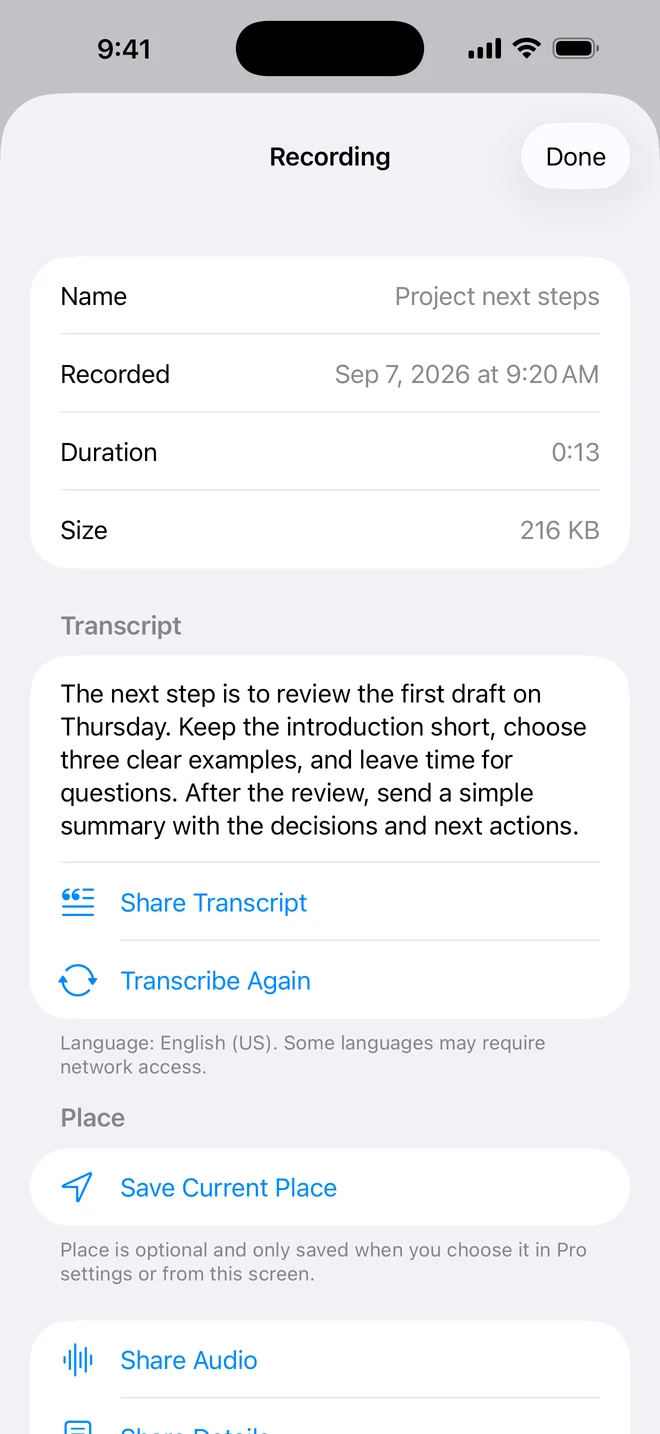
A recording called "Project next steps" may contain the sentence you actually remember: "Review the first draft on Thursday." Searching only the title would miss it. Searching the saved transcript can lead you back to the recording.
This is useful for interviews, meetings, lectures, voice journals, song ideas, and spoken reminders. You do not need to remember when you recorded it. Start with a distinctive word, person's name, place, or short phrase from the conversation.
One useful distinction: OnePress Rec searches text that has already been transcribed. It does not listen through every audio file each time you search.
How to search words inside a recording.
- Record and save your audio in OnePress Rec.
- Open the recording details and choose Transcribe Recording. Use a free transcription allowance or Pro. Completed transcripts remain searchable after the allowance is used.
- Wait until the transcript is complete. Check important names, dates, and numbers against the original audio.
- Return to the main screen and tap View All beside Recordings.
- Type a word or phrase you remember into search. Rec checks recording names, dates, saved places, and completed transcripts.
- Open the matching recording and play the audio to confirm the context.
Search the unusual word first.
A common word such as "the" may match many recordings. A project name, product, street, person, or unusual phrase is more likely to narrow the list quickly. If the full phrase returns nothing, try one important word from it.
Recognition quality matters too. Choose the language you actually spoke, reduce background noise when possible, and keep the iPhone reasonably close to the speaker. If Danish speech produces English-looking text, follow the guide to choose the right transcript language and transcribe again.
What spoken-word search can and cannot find.
Search can find text in a completed transcript. It can also find recording names, displayed dates, saved estimated places, and coordinates. An older recording without a transcript will still be searchable by its name and other saved details, but not by words in its audio.
Speech recognition is not a perfect written record. Accents, overlapping voices, specialist terms, mixed languages, and poor audio can change or omit words. Search may miss a phrase if the transcript contains a different spelling. Try a nearby word, then listen to the recording before relying on the result.
Your recording stays local unless a chosen service is needed.
OnePress Rec stores recordings and saved transcripts on your device. OnePress does not receive them on its own servers. Transcription uses Apple Speech Recognition, and some supported languages may require Apple's online service. Availability depends on the language, device, permission, internet connection, and Apple's service.
Search happens across the details saved in your Rec library. Sharing and optional backup go only to destinations you choose. Read the OnePress privacy policy for the full distinction.